
Quick Summary & Key Takeaways (Featured Snippet)
What is a Universal Account Number (UAN)?
Administered by the Employees' Provident Fund Organisation (EPFO) under the Employees' Provident Funds and Miscellaneous Provisions Act, 1952, the Universal Account Number (UAN) is a 12-digit permanent identification number allotted to every formal salaried employee in India.
Before the introduction of UAN, changing jobs meant opening a brand-new Provident Fund (PF) account with every new employer, leading to scattered, dormant accounts and difficult paper-based transfers. UAN acts as a permanent digital umbrella: no matter how many times you switch jobs, your UAN remains constant, while new Member IDs (MIDs) generated by successive employers are linked beneath it.
Statutory Architecture: UAN vs Member ID
Your Member ID (e.g. MH/BAN/0012345/000/0006789) represents an individual employment relationship with a specific establishment. Your UAN (e.g. 100123456789) is your permanent citizen-level EPFO identity that links all your past and present Member IDs together into a single unified ledger.
Why You Must Activate Your UAN Immediately
While your employer creates your UAN and deposits monthly 12% employee and employer contributions, the account remains dormant from a member perspective until you activate it. Activating unlocks essential digital self-service capabilities:
- Real-Time Passbook Access: Download your electronic PF passbook to verify whether your employer is depositing monthly contributions and annual 8.25% interest.
- Online PF Advance & Withdrawals: File instant claims for medical emergencies, home construction, marriage, or COVID illness without employer signature.
- Automated Online Transfer (Form 13): Transfer your PF corpus seamlessly from an old employer to your new company in just 3 clicks.
- SMS & WhatsApp Balance Alerts: Receive automated monthly SMS alerts every time an ECR contribution is credited to your ledger.
Step-by-Step UAN Activation Process
Navigate to Member e-Sewa Portal
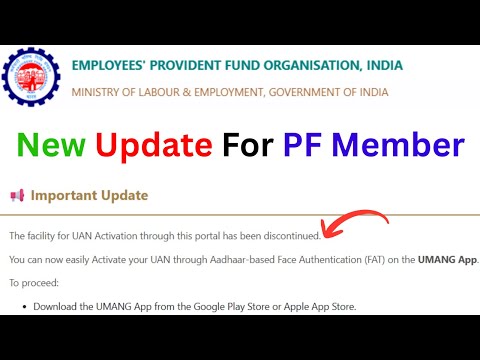
Visit unifiedportal-mem.epfindia.gov.in/memberinterface/ and click on the "Activate UAN" link located in the Important Links section.
Enter Identification & Demographic Data
Select the "UAN" radio button and enter your 12-digit UAN. Enter your Aadhaar Number, Name, Date of Birth (DD/MM/YYYY), and your 10-digit Aadhaar-linked mobile number.
Authenticate via Aadhaar OTP
Tick the statutory consent declaration authorizing EPFO to authenticate via UIDAI. Click "Get Authorization PIN". Enter the 6-digit OTP received on your phone.
Validate OTP & Receive Password
Click "Validate OTP and Activate UAN". A confirmation message displays: "Your UAN is activated. Password has been sent to your registered mobile."
Mandatory Aadhaar Linking Rules (Section 142)
Under Section 142 of the Code on Social Security, 2020, linking Aadhaar with your UAN is a statutory prerequisite. Employers cannot generate Electronic Challan cum Returns (ECR) or deposit monthly PF dues for any employee whose UAN is not linked and verified with Aadhaar.
Bank Account KYC & Employer DSC Approval
To ensure PF claim settlements are disbursed directly to your personal bank account:
- Log in to the Member Portal, go to Manage > KYC, select "Bank", and input your Bank Account Number and exact IFSC Code.
- Once submitted, the request moves to "Pending with Employer for Digital Signature Certificate (DSC) Approval".
- For leading public and private banks (SBI, PNB, HDFC, ICICI, Axis), EPFO has implemented Automated Bank Verification via API, validating the account within 48 to 72 hours without requiring manual employer DSC approval.
How to Merge Multiple Member IDs Under One UAN
If you changed jobs and your previous company generated a separate Member ID (MID), follow this protocol to consolidate your service history and corpus:
Online Transfer Request (Form 13)
Log in to the Member Portal, navigate to Online Services > One Member - One EPF Account (Transfer Request). Review your personal information and current MID. Enter your previous Member ID or previous UAN. Choose whether your previous employer or current employer will attest the claim, authenticate via Aadhaar OTP, and submit. The funds and service history transfer within 7 to 10 working days.
Fixing Name/DOB Mismatches Online (Joint Declaration SOP)
Under EPFO's landmark Standard Operating Procedure (SOP), members can now rectify demographic discrepancies completely paperless:
| Mismatch Field | Correction Scope | Acceptable Supporting Proofs |
|---|---|---|
| Member Name / Father's Name | Minor spelling corrections or full name alignment with Aadhaar | Aadhaar Card, Passport, PAN Card, Voter ID |
| Date of Birth (DOB) | Difference up to 3 years (Minor) or > 3 years (Major) | Birth Certificate, Passport, 10th Class Marksheet |
| Date of Joining / Exit (DOJ / DOE) | Correction of employment service dates | Appointment letter, Relieving letter, Wage slips |
Mandatory Documents for UAN Activation
- 12-Digit UAN Number (found on your monthly salary pay slip).
- 12-Digit Aadhaar Card Number (with active linked mobile number).
- PAN Card details (mandatory for tax exemption on withdrawals < 5 years service).
- Bank Account Passbook / Cancelled Cheque showing Account Number, Name, and IFSC.
Comparison: UAN vs Member ID (MID)
| Parameter | Universal Account Number (UAN) | Member ID (MID / PF Number) |
|---|---|---|
| Format | 12-digit numeric code (e.g. 100123456789) | Alphanumeric string (State/Office/Est/Ext/Member) |
| Permanence | Lifetime Permanent (Never changes across jobs) | Temporary (New MID generated by each employer) |
| Portal Login | Acts as the universal username for member login | Cannot be used for portal login |
Real-World Member Case Studies
1Anita (Software Engineer): Merging 3 Scattered Accounts
Anita changed employers three times over 8 years. Each employer had created a different Member ID, leaving ₹4.2 Lakhs scattered in old non-earning accounts.
2Rahul (Manufacturing Technician): Name Mismatch Fix
Rahul's UAN recorded his name as "Rahul K Sharma" while his Aadhaar recorded "Rahul Kumar Sharma", blocking his UAN activation attempt.
Top 5 Activation Errors & Instant Fixes
Security Best Practices & Fraud Prevention
- Never Share UAN Passwords: EPFO officials NEVER call, email, or message asking for your UAN password or Aadhaar OTP.
- Use Strong Passwords: Passwords must be at least 8 characters long with uppercase, lowercase, numbers, and special symbols (e.g.
Epfo#Secure2026).
Accessing Your Electronic EPF Passbook
Once your UAN is activated, wait 6 hours for database synchronization, then log into the dedicated passbook portal at passbook.epfindia.gov.in. Here you can inspect:
- Monthly Employee Share (12%) and Employer Share (3.67% EPF + 8.33% EPS).
- Annual interest credits declared by the Central Board of Trustees (CBT).
- Net balance available for immediate non-refundable advance withdrawals.
EPFO Troubleshooting Decision Matrix
| Issue Encountered | Root Cause | Instant Corrective Action |
|---|---|---|
| Aadhaar authentication fails during activation | Spelling mismatch in Name or DOB | Submit online Joint Declaration with employer approval. |
| Multiple UANs assigned by different companies | New employer opened new UAN instead of linking MID | File online transfer (Form 13) to merge into current UAN. |
| Bank KYC rejected repeatedly | Name in bank account differs from EPFO records | Align name in bank branch first, then resubmit on portal. |
EPFO Member Action Checklist
✓ Ensure your mobile number is active on UIDAI to receive Aadhaar OTPs.
✓ Change your default SMS password to a strong custom password upon first login.
✓ Upload and verify your Bank Account Number and PAN under the KYC tab.
✓ Register an e-Nomination on the Member Portal to safeguard family pension claims.
Recommended Video Tutorials & Practical Walkthroughs
Watch these handpicked, expert video guides covering practical compliance, step-by-step procedures, and real-world implementation:
Recommended Video Tutorials & Practical Guides

Frequently Asked Questions (FAQs)
What is a Universal Account Number (UAN) in EPFO?
▼
A Universal Account Number (UAN) is a unique 12-digit permanent identification number issued by the Employees' Provident Fund Organisation (EPFO) to every contributing salaried employee. It acts as an overarching umbrella linking all individual Member IDs (PF Account Numbers) allotted by different employers across your entire career.
What are the prerequisites to activate UAN online on the Member Portal?
▼
The mandatory prerequisites are: (1) Your 12-digit UAN or Member ID provided by your employer; (2) Your 12-digit Aadhaar number; (3) An active mobile number registered with UIDAI for OTP verification; and (4) Your Name, Date of Birth, and Gender matching your Aadhaar records verbatim.
Why is Aadhaar linking legally mandatory for EPFO accounts?
▼
Under Section 142 of the Code on Social Security, 2020, linking Aadhaar with UAN is mandatory for the receipt of social security benefits, employer Electronic Challan cum Return (ECR) filing, and processing online advance/final PF withdrawals.
How can I merge two different UAN numbers generated by different employers?
▼
If you have two UANs, you must retain your current active UAN and request the closure/merger of the previous UAN. Submit an online transfer claim (Form 13) on the Member Portal to transfer the service history and PF corpus from the old Member ID to the new UAN. Once transferred, the previous UAN is automatically deactivated by EPFO.
What should I do if my Name or Date of Birth in EPFO does not match Aadhaar?
▼
You can submit an online Joint Declaration request on the EPFO Unified Member Portal under the 'Manage' tab. Upload supporting documents (Aadhaar, Passport, PAN, or Birth Certificate). Your employer approves the request using their Digital Signature Certificate (DSC), after which it is routed to the EPFO Field Officer for electronic correction.
How long does it take for UAN activation to become functional?
▼
UAN activation is instantaneous upon entering the valid Aadhaar OTP. However, viewing and downloading your electronic passbook on the EPFO Member Passbook portal (epfindia.gov.in) takes approximately 6 hours after initial activation.
Statutory Sources & Regulatory References
- Employees' Provident Funds and Miscellaneous Provisions Act, 1952.
- Code on Social Security, 2020 – Section 142 (Mandatory Aadhaar Authentication).
- Employees' Provident Fund Organisation (EPFO) – Standard Operating Procedure (SOP) for Joint Declaration Profile Corrections (2024).
- EPFO Unified Member Portal User Operating Manual.