
Quick Summary & Key Takeaways (Featured Snippet)
1. What is the Digital e-EPIC Card?
For decades, Indian voters who lost their physical laminated or PVC voter ID cards faced arduous delays visiting Tehsil offices, Sub-Divisional Magistrate (SDM) centers, or paying unauthorized agents to print duplicate cards.
To modernize electoral democracy, the Election Commission of India (ECI) rolled out the Electronic Electoral Photo Identity Card (e-EPIC) initiative. e-EPIC is an official digital document in secured PDF format that can be generated dynamically by any registered elector. It eliminates the physical card delivery wait-time, empowering over 96 crore Indian citizens to access their voting identity from any smartphone or desktop.
2. Target Beneficiaries & Use Cases
Youth who recently applied via Form 6 and received their EPIC number who wish to download their card instantly without waiting months for postal speed-post delivery.
Voters who transferred their constituency or assembly segment via Form 8 and need an updated card reflecting their new polling booth and part number.
Electors whose physical cards were lost, stolen, or mutilated who need an immediate, valid photo identity for polling day or official verification.
3. Digital e-EPIC vs Physical PVC Card
Digital e-EPIC (PDF)
- Instant 2-minute digital download from ECI server.
- 100% Free of Cost.
- Stored permanently on phone, cloud, or DigiLocker.
- Equipped with a cryptographic QR code readable by polling officers.
- Can be laminated or self-printed on any standard card stock.
Physical PVC Card
- Printed on durable plastic PVC with embedded micro-holograms.
- Dispatched via Department of Posts Speed Post (takes 3 to 8 weeks).
- Free for newly registered voters; duplicate orders cost ₹25–₹30 at CSCs.
- Wallet-friendly credit card format for physical carrying.
4. Operating Mechanism: The OTP Architecture
Because an Electoral Photo Identity Card represents a sovereign democratic voting entitlement, ECI enforces strict multi-factor authentication protocols:
- EPIC Query: Elector enters their alphanumeric 10-digit EPIC number (e.g.,
ABC1234567) on the portal. - Database Mapping: The central server matches the EPIC with the voter’s state, assembly constituency, and linked mobile number.
- One-Time Password (OTP): A 6-digit OTP is dispatched to the registered mobile number (valid for 10 minutes).
- Dynamic Rendering: Upon correct OTP entry, the system dynamically compiles and downloads the digitally signed, non-editable e-EPIC PDF file.
5. Statutory Eligibility & Mobile Linking Rule
Mandatory Criteria to Download e-EPIC:
- Must be a registered Indian citizen with your name active in the Electoral Roll.
- Must possess a valid 10-digit alphanumeric EPIC Number or Form 6 Reference Number.
- The Mobile Number Rule: A unique mobile number must be mapped to your EPIC. If multiple family members share the exact same mobile number in older voter lists, the system requires each individual voter to update a unique or verified mobile via Form 8.
6. Form 8: How to Link Your Mobile Number
Getting "Mobile Number Not Registered" Error? Here is the Fix:
If your mobile is not linked, you cannot download the e-EPIC immediately. You must file a quick digital Form 8 (Correction of Entries in Electoral Roll):
- Log into voters.eci.gov.in and select "Form 8 (Shifting of Residence / Correction of Entries)".
- Select "Self", enter your EPIC number, and choose the option: "Correction of Entries in Existing Electoral Roll".
- Check the box for "Mobile Number". Enter your 10-digit mobile number, verify via OTP, and submit.
- You receive an Application Reference Number. Once the Booth Level Officer (BLO) verifies and ERO approves (typically within 7 to 14 days), your mobile is linked permanently, unlocking e-EPIC download.
7. How to Find a Lost EPIC Number Online
If you lost your physical voter ID and don't remember your 10-digit EPIC number, you can retrieve it in 60 seconds:
- Search by Details: Enter your full name, father's/husband's name, age/DOB, gender, state, district, and assembly constituency.
- Search by Mobile: Select your state, enter your 10-digit registered mobile number, and enter the OTP to fetch all linked voter details.
- Search by EPIC: Enter the number directly if known to view current polling booth allocations.
8. Step-by-Step e-EPIC Download Blueprint
Step 1: Visit voters.eci.gov.in & Sign In
Navigate to voters.eci.gov.in (the unified portal replacing old NVSP state portals). Click "Sign In" using your registered mobile number and password, verified with a captcha and OTP.
Step 2: Select "E-EPIC Download"
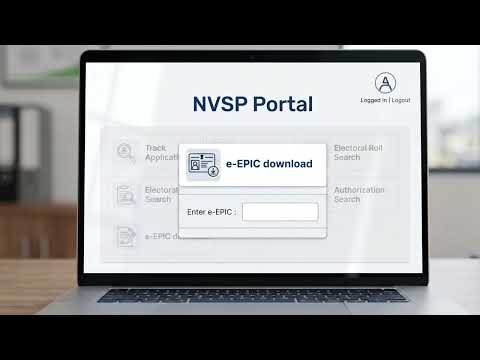
On the home dashboard, click on the prominent purple tile: "E-EPIC Download".
Step 3: Enter EPIC Number & Select State
Select "EPIC No", enter your 10-digit alphanumeric code, choose your home State/UT from the dropdown menu, and click "Search". The screen displays your name, relative's name, and masked mobile number.
Step 4: Authenticate with Mobile OTP & Download PDF
Click "Send OTP". Enter the 6-digit OTP received on your mobile. Click "Verify". Upon successful validation, click "Download e-EPIC" to save the high-resolution vector PDF.
9. Master Comparison: e-EPIC vs PVC vs DigiLocker
| Feature | Digital e-EPIC (ECI Portal) | Physical PVC Voter Card | DigiLocker Issued Card |
|---|---|---|---|
| Availability Speed | Instant (2 Minutes) | 3 to 8 Weeks via Speed Post | Instant via DigiLocker App |
| Issuance Cost | 100% Free (Nil) | Free on 1st issue / ₹25-30 duplicate | 100% Free (Nil) |
| Polling Booth Acceptance | 100% Valid (Printed Copy) | 100% Valid | Valid (Mobile display / print) |
| QR Code Verification | Cryptographic ECI QR Code | Printed QR / Barcode | DigiLocker Digital Signature |
10. Real-Life Case Study: Voting on Polling Day
Scenario: Misplaced Physical Card on General Election Morning
Aditya woke up on polling day in Bengaluru to discover that his physical PVC voter card had been misplaced during home renovation. Polling was closing at 6:00 PM.
8:32 AM: Entered his EPIC number, received OTP on his registered phone, and downloaded the e-EPIC PDF.
8:40 AM: Printed a color copy on photo paper at a neighborhood cyber cafe (Cost: ₹10).
9:15 AM: Visited his polling station. The Polling Officer scanned the e-EPIC QR code with the ECI Polling App, verified his serial number in the active roll, marked his finger with indelible ink, and allowed him to cast his ballot smoothly.
11. Costly Mistakes & The Unlinked Mobile Error
Pitfall 1: Assuming Form 6 Acknowledgment Slip Equals an e-EPIC
When you apply as a new voter, you receive an application reference number. You CANNOT download an e-EPIC until the Electoral Registration Officer formally approves your application and generates an official 10-digit EPIC number. Check status on the portal first.
Pitfall 2: Visiting Third-Party Fake Websites Paying ₹50–₹100
Scam websites mimicking ECI logos charge fees to "download voter cards." The official Election Commission portal voters.eci.gov.in NEVER charges any fee. Never share OTPs or payment details on unauthorized domains.
12. Inherent Limitations & Electoral Roll Supremacy
Critical Constitutional Rule:
Possessing an e-EPIC card or physical PVC card does NOT guarantee voting rights if your name has been struck off or deleted from the current Electoral Roll during periodic revisions.
- The Electoral Roll is the ultimate legal authority. If your name is in the roll, you can vote even with alternate photo IDs (Passport, Driving License, Aadhaar, PAN card).
- If your name is NOT in the roll, even holding a physical original voter card will not allow you into the voting compartment.
13. Legal Validity: RP Act 1951 & Rule 49K
Representation of the People Act, 1951 & Conduct of Elections Rules, 1961
Under Rule 49K of the Conduct of Elections Rules, the Presiding Officer must satisfy themselves as to the identity of the elector. ECI statutory orders explicitly declare e-EPIC as a recognized, legally valid document on par with physical identity cards.
Valid as National Identity & Address Proof
The printed e-EPIC is officially recognized as valid Proof of Identity (PoI) and Proof of Address (PoA) for passport applications, bank account opening, SIM card activation, and property registrations.
14. Decision Matrix: When to Use Which Format
| User Situation | Best Recommended Medium | Action Required |
|---|---|---|
| Urgent voting on election day / Immediate KYC | Digital e-EPIC PDF (Self-Print) | Download from voters.eci.gov.in; print color copy. |
| Everyday physical wallet identity card | Official Physical PVC Card | Wait for Speed Post delivery or order via CSC. |
| Digital document vault on smartphone | DigiLocker Issued Voter ID | Pull into DigiLocker app using EPIC number. |
15. Pre-Download Verification Checklist
Recommended Video Tutorials & Practical Walkthroughs
Watch these handpicked, expert video guides covering practical compliance, step-by-step procedures, and real-world implementation:
Recommended Video Tutorials & Practical Guides

16. Frequently Asked Questions
What is an e-EPIC and is it legally valid for voting?
e-EPIC (Electronic Electoral Photo Identity Card) is a secure, non-editable portable document format (PDF) version of the voter ID card issued by the Election Commission of India (ECI). It contains a verifiable secure QR code with the elector's photo and demographic details. Under ECI statutory orders, a printed e-EPIC is 100% legally valid for voting at polling booths and as a government photo identity proof across India.
Why does the portal display 'Mobile number not registered' during e-EPIC download?
To download an e-EPIC, the elector's unique mobile number must be mapped to their EPIC in the electoral database for OTP security. If your mobile is not linked, you must submit an online 'Form 8' (Correction of Entries) on voters.eci.gov.in. Once the Electoral Registration Officer (ERO) approves the update (usually in 7-14 days), you can download the card instantly.
Does it cost any money to download an e-EPIC from the ECI portal?
No! Downloading the e-EPIC PDF from the official Voters' Services Portal (voters.eci.gov.in) or Voter Helpline Mobile App is completely 100% free of cost. You can save it on your smartphone or DigiLocker.
How can I find my EPIC number if I lost my physical voter card?
You can retrieve your EPIC number by using the 'Search in Electoral Roll' feature on voters.eci.gov.in. Enter your name, father's/husband's name, age, state, and district, or search using your registered mobile number or Aadhaar. The portal will display your EPIC number, part number, and serial number.
Can I vote if I have an e-EPIC but my name is deleted from the voter list?
No! Under the Representation of the People Act, 1951, possessing an EPIC or e-EPIC card alone does NOT give you the right to vote. Your name MUST be present in the active, updated Electoral Roll of your polling station on election day. Always verify your enrollment status in the electoral list before voting.
17. Statutory References & Citations
Election Commission of India (ECI): Guidelines on e-EPIC (Electronic Electoral Photo Identity Card) and Digital Identification Protocols.
Representation of the People Act, 1950 & 1951: Statutory provisions regarding registration of electors and conduct of elections.
Conduct of Elections Rules, 1961: Rule 49K (Identification of electors at polling stations).