
Is DigiLocker legally valid for police verification, traffic checks, and airport entry in India?
Yes, 100% legally valid. Under Rule 9A of the Information Technology (Digital Locker) Rules, 2016, issued electronic records pulled into your DigiLocker account from government databases are legally deemed at par with original physical documents. Traffic police cannot penalize you for not carrying physical Driving Licences or Vehicle Registration Certificates (RC) if you present them via the official DigiLocker or mParivahan app (confirmed by MoRTH). Similarly, the Bureau of Civil Aviation Security (BCAS) and CISF accept DigiLocker Aadhaar and voter IDs for domestic airport terminal entry across India.
1. What is DigiLocker?
DigiLocker is a flagship digital public infrastructure initiative under the Digital India program, developed and managed by the National e-Governance Division (NeGD) under the Ministry of Electronics and Information Technology (MeitY).
It serves as a secure, cloud-based platform for issuing and verifying documents and certificates in a completely paperless manner. Instead of carrying bulky folders containing original plastic cards and marksheets that risk loss, theft, or rain damage, Indian citizens can maintain an authentic digital repository directly tied to their Aadhaar identity.
2. Who Needs It & Primary Use Cases
- Motorists & Drivers: To store and present authentic Driving Licences, Vehicle RCs, and Motor Insurance policies during traffic stops without risking document confiscation.
- Air Travelers & Commuters: To display government photo identity proof at airport CISF checkposts and railway stations without carrying physical wallets.
- Students & Job Seekers: Instant access to CBSE, CISCE, and state education board Class 10/12 marksheets, degree certificates, and APAAR (EduLocker) student IDs for college admissions and employer background checks.
- Taxpayers & Investors: Instantly fetch e-PAN cards, Form 26AS, and Mutual Fund CAS statements during bank KYC audits and demat account openings.
3. Issued Documents vs Uploaded Documents
Understanding this fundamental distinction is crucial to avoiding traffic challans or verification rejections:
Issued Documents (Legally Binding)
Electronic records fetched directly from the database of the issuer (e.g., MoRTH for DL, Income Tax for PAN, CBSE for Marksheets). They carry an official digital signature, timestamp, and QR verification link. Under Rule 9A, these are statutorily identical to physical originals.
Uploaded Documents (Personal Cloud Storage)
PDFs or images scanned and uploaded by the user into their 1 GB DigiLocker drive (e.g., rent agreements, medical bills, private receipts). These do not have legal validity under Rule 9A and will not be accepted by traffic police or airport security as valid ID.
4. Architecture & National API Integration
DigiLocker does not store static scanned images of your certificates. Instead, it functions via real-time Uniform Resource Identifier (URI) links connecting three entities:
- The Citizen (You): Authenticated via Aadhaar OTP and a 6-digit security PIN.
- The Issuer (UIDAI, CBSE, MoRTH, NSDL): Institutional databases that publish digitally signed XML/JSON records via national API gateways.
- The Requester (Traffic Police, Airport Security, Banks): Authorised verification portals that scan the embedded cryptographic QR code to confirm document authenticity in real time without human tampering.
5. Account Setup Prerequisites & Aadhaar Linkage
Prerequisites to Create an Account:
- Aadhaar Number: 12-digit unique identity number.
- Aadhaar-Linked Mobile Number: Mandatory to receive One Time Passwords (OTPs) for registration and document pulling.
- 6-Digit Security PIN: User-created numeric PIN for app login security.
- Exact Demographics Match: Your registered name and date of birth must match your official documents.
6. Free Cloud Storage & Pricing Model
100% Free Public Utility
DigiLocker is completely free of charge. There are no subscription fees, download fees, or renewal costs. Every Indian citizen is allotted 1 GB of secure cloud storage for life. There are no limits on the number of official "Issued Documents" you can fetch from government departments.
7. Top Government Documents You Can Fetch
UIDAI Aadhaar Card
Masked or full e-Aadhaar with digital signature
Ministry of Road Transport
Driving Licence & Vehicle Registration (RC)
Income Tax Department
e-PAN Card verification record
Education Boards
CBSE, ICSE, State Boards Class 10/12 Marksheets
Insurance Companies
Vehicle Two-Wheeler / Four-Wheeler Policies
Health & Welfare
Ayushman Bharat Card, Ration Card, COVID Cert
8. Step-by-Step Account Setup & Document Retrieval
Step 1: Download App or Access Web Portal
Install the official "DigiLocker" app from Google Play Store or Apple App Store, or visit digilocker.gov.in. Click "Sign Up".
Step 2: Enter Bio-Data & Security PIN
Enter your full name as per Aadhaar, date of birth, gender, mobile number, email ID, and set a secret 6-digit numeric security PIN.
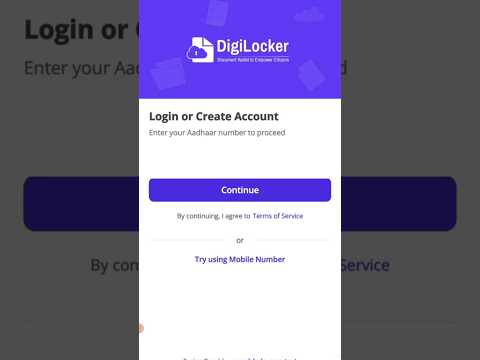
Step 3: Aadhaar OTP Verification
Enter your 12-digit Aadhaar number. Submit the OTP sent to your Aadhaar-registered mobile number to complete biometric linking.
Step 4: Search Issuer & Pull Documents
Go to the "Search" tab. Type "Ministry of Road Transport" > Select "Driving Licence" > Enter your DL number and date of birth > Click "Get Document".
Step 5: Access Issued Section Offline
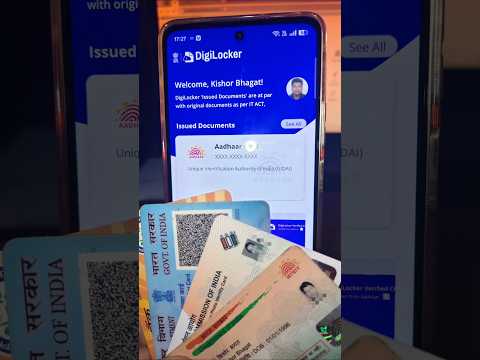
The verified document appears in your "Issued Documents" tab with a green checkmark. It remains cached on your phone for offline display without internet.
9. DigiLocker vs Phone Gallery Scans vs Physical Originals
| Feature | DigiLocker Issued Document | Phone Gallery Photo / PDF | Physical Original Card |
|---|---|---|---|
| Legal Parity (Rule 9A) | 100% Legally Valid | Zero Legal Parity | 100% Legally Valid |
| Traffic Police Acceptance | Mandatory Acceptance | Challan / Fine Applicable | Mandatory Acceptance |
| Airport Gate CISF Entry | Accepted Nationwide | Rejected at Gates | Accepted Nationwide |
| Risk of Physical Loss | Zero (Backed on secure cloud) | Zero (on device) | High (Theft, damage, fading) |
10. Real-World Case Studies
Case Study 1: Traffic Checkpoint in Mumbai without Physical DL
Suresh was stopped on the Western Express Highway in Mumbai for a routine vehicle document check. Having left his physical wallet at home, he opened the DigiLocker app and displayed his Driving Licence and RC under the "Issued Documents" tab. The traffic officer scanned the QR code using his departmental e-challan handheld device, verified the real-time VAHAN sync, and let Suresh proceed with zero penalty.
Case Study 2: Airport Terminal Entry at Delhi T3
Meera reached Delhi IGI Terminal 3 for a flight to Hyderabad only to realize she forgot her physical Aadhaar and passport. Rather than returning home and missing her flight, she presented her DigiLocker app showing her issued Aadhaar card along with her boarding pass. The CISF security guard verified the live app screen (photographs or screenshots are barred) and granted her immediate entry.
11. Fatal User Errors & Legal Misconceptions
- Showing Screenshots or Gallery Photos: Showing a phone screenshot of your DigiLocker app will be rejected by CISF and police. You must open the live app to prove identity.
- Relying on Uploaded Drive Files for Traffic Stops: Storing a scanned PDF of your RC in the "Drive" section will NOT prevent traffic challans. Only documents under "Issued Documents" carry Rule 9A protection.
- Name Mismatches between Aadhaar and Academic Records: If your name in your 10th marksheet contains an initial but Aadhaar has full expansion, the automated API pull will fail. You must update Aadhaar demographics to resolve this.
12. Privacy Security & Unlinked Aadhaar Risks
While DigiLocker is heavily fortified with 256-bit SSL encryption, users must observe essential cyber hygiene:
Aadhaar Mobile Inactivity Risk
If you change your mobile number without updating UIDAI records, you cannot log into DigiLocker on a new device. Always keep your Aadhaar mobile number updated.
Biometric & App Lock
Enable fingerprint or Face ID lock on the DigiLocker app to prevent unauthorized access if your smartphone is stolen or unlocked by third parties.
13. Rule 9A of IT Rules 2016 & BCAS Airport Mandates
The statutory foundation that gives DigiLocker its unassailable legal power:
- Rule 9A of IT (Digital Locker) Rules, 2016: "The issued documents in Digital Locker system shall be treated at par with original physical documents issued by the issuing authority."
- Section 4 of Information Technology Act, 2000: Grants legal recognition to electronic records where any law provides that information or documents shall be in writing.
- MoRTH Circular RT-11036/64/2017-MVL: Clarified that vehicle documents presented through DigiLocker or mParivahan platforms are recognized under the Motor Vehicles Act, 1988.
14. DigiLocker vs mParivahan: When to Use Which
Application Usage Guide:
- Use DigiLocker: For all-in-one comprehensive documentation (Aadhaar, PAN, Education Marksheets, Airport Entry ID, Insurance, plus Driving Licence & RC).
- Use mParivahan: Exclusively for transport-related workflows (checking vehicle challan status, e-challan payments, road tax details, and virtual RC sharing with family members).
15. Essential Digital Vault Setup Checklist
Recommended Video Tutorials & Practical Walkthroughs
Watch these handpicked, expert video guides covering practical compliance, step-by-step procedures, and real-world implementation:
Recommended Video Tutorials & Practical Guides
16. Frequently Asked Questions
Are documents shown on the DigiLocker app legally valid across India?
Yes. Under Rule 9A of the Information Technology (Preservation and Retention of Information by Intermediaries Providing Digital Locker Facilities) Rules, 2016, electronic documents issued into a citizen's DigiLocker account are treated at par with original physical documents and must be recognized by all government departments, law enforcement agencies, and courts.
Can traffic police fine you if you show your Driving Licence and RC on DigiLocker?
No. The Ministry of Road Transport and Highways (MoRTH) has issued standard notifications to all state police commissioners stating that Driving Licences and Vehicle RCs presented via the DigiLocker or mParivahan app are legally valid and police cannot demand physical copies or issue challans for not carrying plastic cards.
What is the critical difference between "Issued Documents" and "Uploaded Documents" in DigiLocker?
Issued Documents are fetched directly from the database of the issuing authority (e.g., UIDAI, MoRTH, CBSE, Income Tax Dept) and contain a verified digital signature; these hold statutory legal parity under Rule 9A. Uploaded Documents are scanned copies or PDFs uploaded by the user to their 1GB cloud drive; these DO NOT enjoy legal parity under Rule 9A and are treated merely as personal copies.
Can I use DigiLocker for identification at Indian airports for domestic flights?
Yes. The Bureau of Civil Aviation Security (BCAS) and CISF accept digital Aadhaar, Driving Licence, and Voter ID presented inside the official DigiLocker app as valid photo identity proof for entry into airport terminals across India.
How much cloud storage does DigiLocker provide and what does it cost?
DigiLocker is 100% free of charge for all Indian citizens as a flagship initiative under Digital India. Every account provides 1 GB of secure cloud storage to upload personal certificates and legal deeds in PDF, JPEG, or PNG formats.