

How do I check my EPF balance and download the electronic member passbook?
To check your Provident Fund balance, visit the official passbook portal at passbook.epfindia.gov.in, enter your 12-digit Universal Account Number (UAN), password, and captcha. Once signed in, select your Member ID to view and download your full historical contribution ledger. Alternatively, give a missed call from your registered mobile number to 9966044425 to receive your latest balance and last contribution via instant SMS.
1. Understanding the EPF 12% Contribution Split: Employee vs Employer
The Employees' Provident Fund and Miscellaneous Provisions Act, 1952 applies to establishments employing 20 or more persons. Every month, a statutory deduction of 12% of basic wages plus Dearness Allowance (DA) is made from the employee's salary, and an equal 12% matching contribution is made by the employer.
100% of the employee's 12% contribution goes directly into the Employees' Provident Fund (EPF) account. This capital earns compounding tax-free interest annually.
- 8.33% is diverted to the Employees' Pension Scheme (EPS) (capped at ₹1,250/month on statutory wage ceiling of ₹15,000).
- 3.67% goes into the employee's EPF balance.
- Employer additionally pays 0.50% towards EDLI (Life Insurance) and 0.50% EPF administrative charges.
2. Step-by-Step: How to Check PF Balance & Download Member Passbook
Follow these verified steps to access your detailed month-by-month contribution statement:
Go to passbook.epfindia.gov.in . Note that passbook facilities are available 6 hours after registering or activating your UAN on the Unified Portal.
Enter your 12-digit UAN, your member password, and solve the arithmetic captcha.
If you have worked with multiple employers, select the specific Member ID. Click 'Download Passbook' to save a complete PDF copy showing your opening balance, monthly employee share, employer share, and total accrued interest.
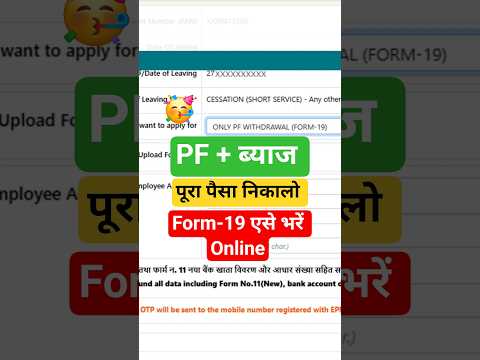
3. Step-by-Step: How to File an Online PF Withdrawal Claim
Employees no longer need physical signatures or attestation from their previous employers. You can apply directly through the EPFO Member e-Sewa portal:
1Prerequisites Before Applying Online
- UAN must be active and linked with verified Aadhaar (verified green badge).
- Bank account details (Account number and IFSC) must be seeded and approved by employer.
- Mobile number linked with Aadhaar must be active to receive UIDAI OTP.
- Date of Exit (DOE) must be updated by the employer if applying for full final settlement (Form 19).
2Executing the Claim on Member e-Sewa
- Log in to unifiedportal-mem.epfindia.gov.in.
- Click on the 'Online Services' top menu and select 'Claim (Form-31, 19, 10C & 10D)'.
- Verify your personal details and enter the last 4 digits of your seeded bank account number to authenticate.
- Click on 'Proceed for Online Claim'.
- Under 'I want to apply for', choose the appropriate claim form (Form 31 Advance, Form 19 Final PF, or Form 10C).
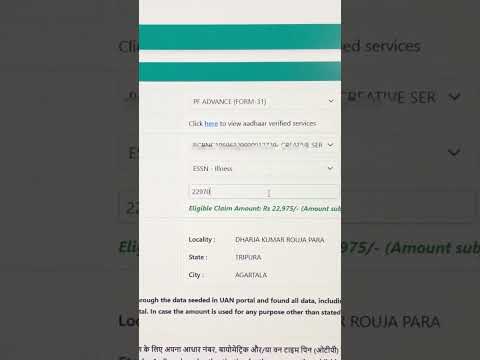
- If claiming Form 31 Advance, select the withdrawal purpose (e.g. Illness, Purchase of House, Education, Marriage).
- Upload a scanned copy of your cancelled cheque or bank passbook (showing name, account number, and IFSC).
- Click 'Get Aadhaar OTP', enter the mobile verification code, and submit the claim.
4. Comparison: Form 19 vs Form 10C vs Form 31
| Parameter | Form 31 (Advance) | Form 19 (Full PF Settlement) | Form 10C (Pension Scheme) |
|---|---|---|---|
| Employment Status | Currently in service (active job) | Left job (2 months unemployment) | Left job with less than 10 years service |
| Repayment Obligation | Non-refundable (no need to repay) | N/A (Full balance payout) | N/A (Pension withdrawal / Certificate) |
| Permissible Grounds | Medical emergency, wedding, home loan, higher studies | Retirement or 60 days of unemployment | Service duration between 6 months and 9.5 years |
| Settlement Time | 3–5 working days (Auto-mode: 72 hrs) | 7–14 working days | 7–14 working days |
5. Income Tax & TDS Rules on EPF Withdrawals (Section 192A)
Taxability on Provident Fund withdrawals depends on the total continuous duration of service:
- If valid PAN is submitted: TDS is deducted at 10%.
- If PAN is not linked: TDS is deducted at the Maximum Marginal Rate (30% + surcharge) or 20%.
- Tax Saving Tip: If your total annual taxable income is below the basic exemption limit (₹3,00,000 / ₹7,00,000 under new tax regime), submit Form 15G / Form 15H on the portal to avoid any TDS deduction!
Recommended Video Tutorials & Practical Guides
6. Frequently Asked Questions (FAQs)
Can I transfer old PF balance to a new company automatically?
Yes. Through the One Employee - One EPF Account service on the Unified Portal, go to 'Online Services' > 'One Member - One EPF Account (Transfer Request)'. Enter your previous Member ID or UAN to transfer your accumulated funds from your past employer to your current employer's account seamlessly.
What should I do if my EPF claim is rejected due to 'Name mismatch in Cheque'?
Ensure the uploaded image of the cancelled cheque clearly shows your printed name, bank account number, and IFSC code. If your cheque book does not have your name printed on it, upload the first page of your bank passbook verified with your branch seal and signature.