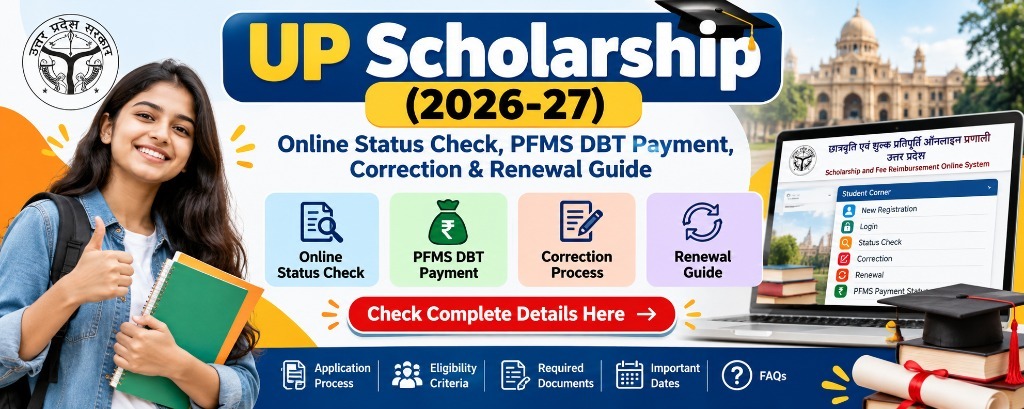
How do I check my UP Scholarship status and verify PFMS payment?
To check your UP Scholarship status, log in to scholarship.up.gov.in under the 'Student' section using your Registration Number, Date of Birth, and Password. Click 'Check Current Status' to see if your application has been verified by your institution and the District Welfare Officer (DWO). Once approved, payment is credited via Direct Benefit Transfer (DBT) to your Aadhaar-seeded bank account. You can track transaction credit in real time on pfms.nic.in via the 'Track DBT Details' module.
1. Official UP Scholarship Timetable & Key Deadlines (2026-27)
The Social Welfare Department, Government of Uttar Pradesh, operates under strict statutory cut-off dates. Missing the institutional forwarding date or the correction window forfeits entitlement for the entire academic cycle:
| Scholarship Cycle & Category | Online Registration Window | Hard Copy Submission to College | Correction Window (संशोधन) | DBT Fund Disbursement |
|---|---|---|---|---|
| Pre-Matric (Classes 9 & 10) - Fresh | 01 July – 10 November 2026 | Within 3 days of submit | 16 Nov – 14 Dec 2026 | 25 Jan – 31 Jan 2027 |
| Pre-Matric (Classes 9 & 10) - Renewal | 01 July – 15 September 2026 | Within 3 days of submit | 17 Sep – 10 Oct 2026 | 29 Sep – 31 Oct 2026 |
| Post-Matric Inter (Classes 11 & 12) | 10 July – 20 December 2026 | Within 3 days of submit | 06 Dec – 31 Dec 2026 | 21 Dec 2026 – 31 Jan 2027 |
| Dashmottar (UG, PG, ITI, Diploma, B.Tech) | 15 July – 15 January 2027 | Within 3 days of submit | 20 Jan – 10 Feb 2027 | 15 Feb – 31 Mar 2027 |
2. Understanding UP Scholarship Portals & Categories
The Uttar Pradesh scholarship architecture (known officially as the Saksham Portal) coordinates across three distinct nodal welfare departments to disburse allowances and tuition reimbursement:

Figure 1: Official UP Scholarship operational flow from OTR enrollment to institutional forwarding, computerized scrutiny, DWO approval, and PFMS APBS fund transfer.
Pre-Matric Scholarship
Designed for high school students. Covers basic school fees, textbook stipends, and maintenance allowances for SC, ST, OBC, General, and Minority categories.
Post-Matric Intermediate
For students enrolled in 11th and 12th standards in UP Board, CBSE, ICSE, or recognized madrasas. Covers academic tuition fees and statutory board examination charges.
Dashmottar (Post-Matric Other)
The highest-volume program. Reimburses major university fees (B.Tech, MBBS, B.Ed, MBA, Polytechnic, BA, B.Sc) up to ₹50,000+ per year directly to qualifying institutions.
3. Complete Step-by-Step Portal Walkthrough (With Official Screenshots)
Follow this visual operating procedure to execute OTR registration, department routing, dashboard authentication, and real-time status verification on scholarship.up.gov.in.
Step 1: Complete Aadhaar One Time Registration (OTR)
Starting with the current academic cycle, the UP Government mandates that every student must first register through the OTR (One Time Registration) system on the Saksham portal. The OTR locks your biometric Aadhaar profile and generates a lifetime 14-digit OTR number.
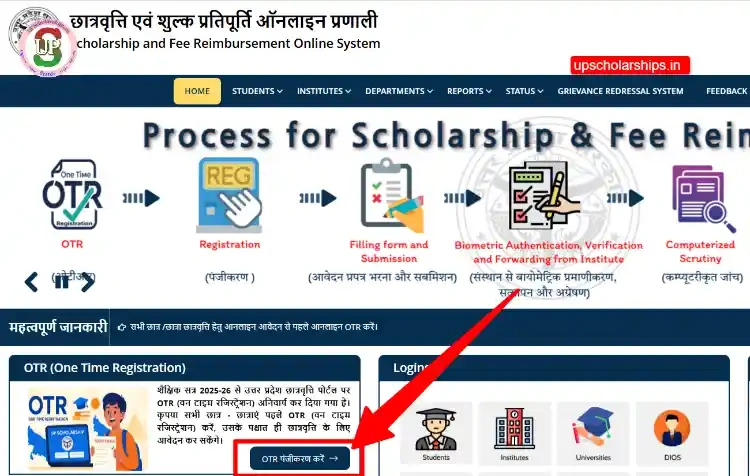
- Click on the prominent blue button labeled 'OTR Registration' on the portal homepage.
- Enter your 12-digit Aadhaar number and the registered mobile number linked with UIDAI.
- Input the 6-digit Aadhaar OTP received on your mobile. Your name, father's name, and date of birth will be auto-imported.
- Copy and preserve your 14-digit OTR ID. You cannot proceed to scholarship registration without this ID.
Step 2: Department & Caste Category Selection
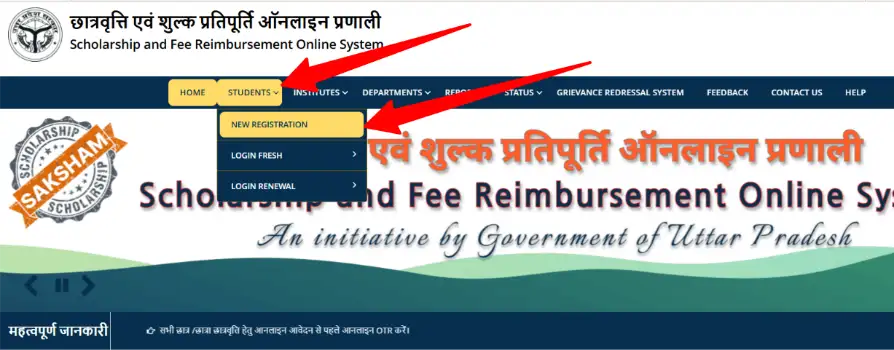
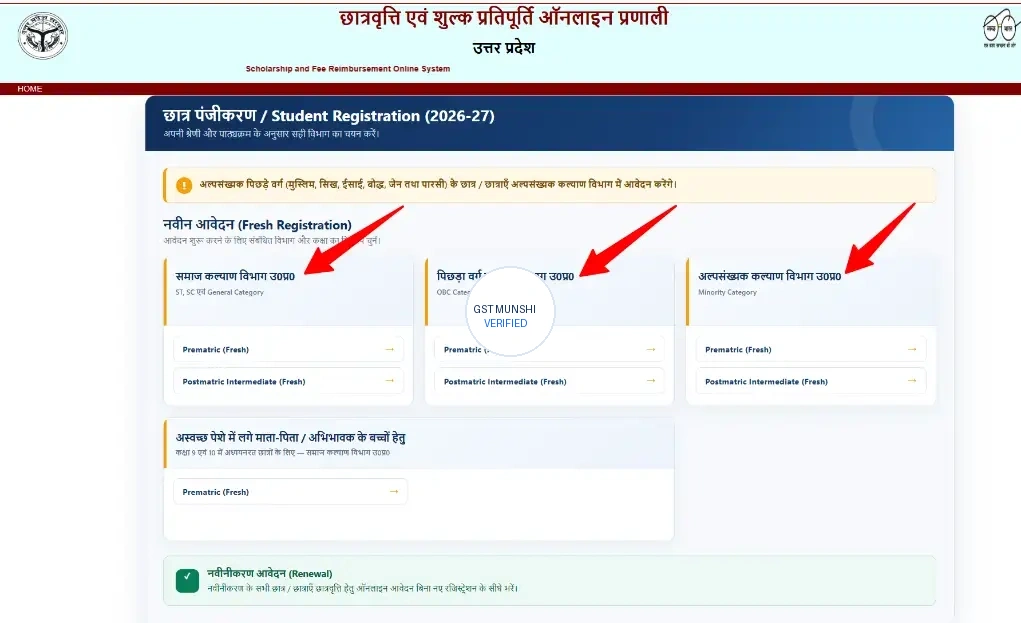
Once OTR is confirmed, navigate to Students > New Registration. The portal segregates applicants into three distinct administrative departments. Choosing the wrong department leads to instantaneous application rejection during computerized scrutiny.
Step 3: Fresh vs Renewal Student Authentication
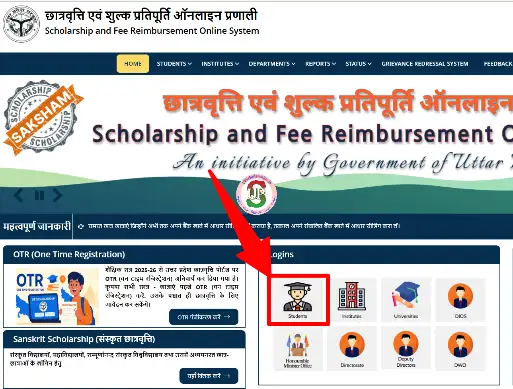
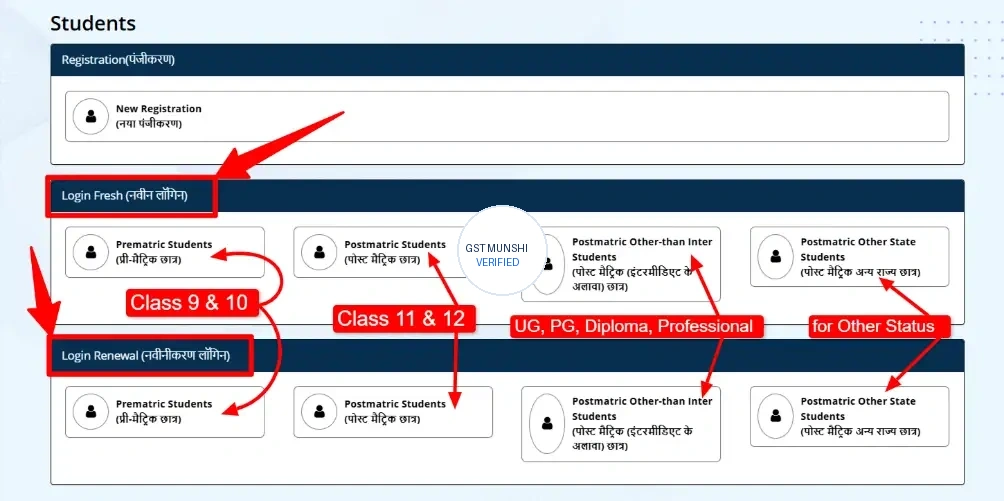
To view your application status or modify forms during the correction window, you must authenticate through the exact academic tier. Select Fresh Login if enrolling in a new course, or Renewal Login if you are continuing in the second, third, or fourth year of your degree.
Step 4: Check Real-Time Application & DWO Verification Status
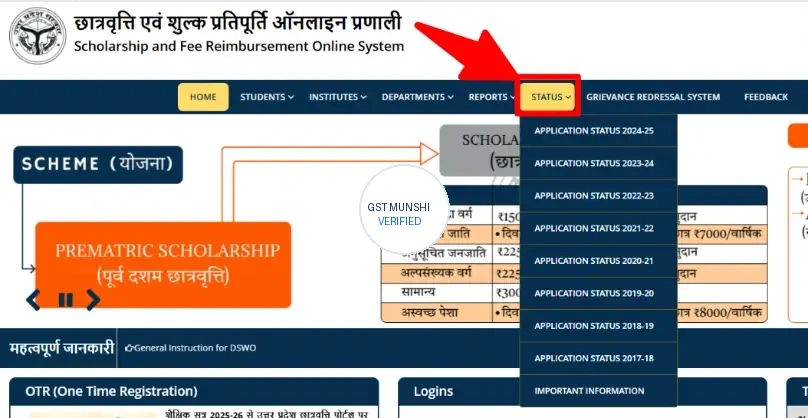
There are two official methods to check status: via the top navigation bar 'STATUS' dropdown (available for previous academic sessions) and directly inside your active Student Dashboard under 'Check Current Status'.
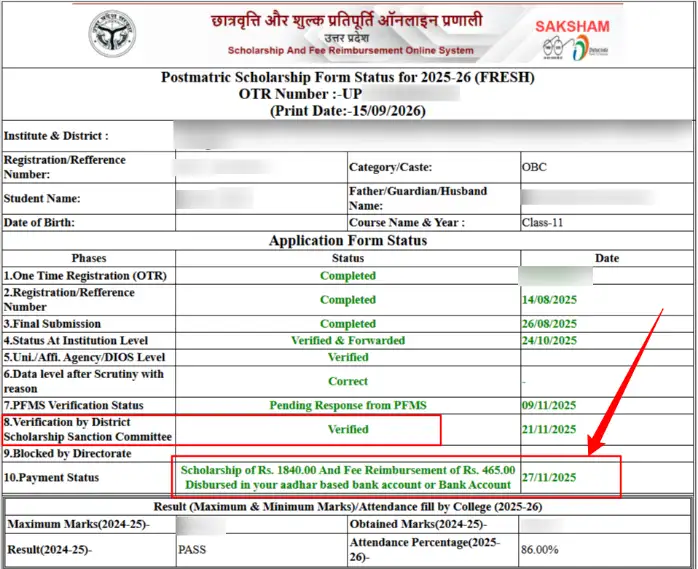
Step 5: PFMS Tracking & Verified Bank DBT Disbursement Proof
When your status reaches 'Verified by District Scholarship Sanction Committee', the state treasury issues payment through the Public Financial Management System (PFMS). The funds are bifurcated into Scholarship Allowance and Tuition Fee Reimbursement:
4. Interactive UP Scholarship & Fee Reimbursement Estimator (2026-27)
Estimate your anticipated tuition fee reimbursement and maintenance stipend based on your course tier, caste category, and hosteller status under official Social Welfare Department regulations:
Instant Scholarship & Fee Reimbursement Estimator
Calculate projected tuition fee reimbursement and maintenance stipend for academic year 2026-27.
5. Portal Status Code Analyzer & Action Protocol
Select the exact status string displayed on your student dashboard to inspect what it legally means and the immediate corrective action required:
Pending at District Scholarship Committee
normalYour application has passed college-level verification and is currently queued for digital audit by the District Welfare Officer (DWO).
- No immediate action required on the portal.
- Check your dashboard weekly. DWOs audit batch records based on caste rosters.
- Ensure your college has physically submitted the master forward list to the Vikas Bhawan.
6. The #1 Cause of Rejection: Aadhaar-NPCI Bank Seeding Inactive
Over 70% of scholarship rejections in Uttar Pradesh are caused by a simple banking misunderstanding: Aadhaar linking is NOT the same as NPCI Seeding.
Standard Aadhaar Link (KYC Only)
Your bank simply holds your Aadhaar number for identity compliance. It does NOT enable your account to receive incoming government welfare subsidies sent through the National Payments Corporation of India (NPCI) gateway.
Aadhaar NPCI Seeding (Mandatory for DBT)
Your bank account is officially designated as the single primary recipient for direct government DBT credits. To activate this, you must visit your bank branch and submit the 'Mandate for Aadhaar Seeding and NPCI Mapping' form.
7. Statutory Fee Reimbursement & Maintenance Allowance Slabs
The UP Government reimburses non-refundable tuition fees directly up to standard government caps, accompanied by monthly maintenance stipends paid across 10 academic months:
| Course Classification | Tuition Fee Reimbursement Cap | Hosteller Monthly Stipend | Day Scholar Monthly Stipend |
|---|---|---|---|
| Pre-Matric (Class 9 & 10) | Full Govt/Recognized School Fee | ₹3,000 / year | ₹1,500 / year |
| Intermediate (Class 11 & 12) | Standard UP Board / CBSE Prescribed Fee | ₹3,800 / year | ₹2,300 / year |
| Undergraduate (BA, B.Sc, B.Com) | Up to ₹9,000 / year | ₹5,500 / year | ₹3,600 / year |
| Polytechnic & ITI Diploma | Up to ₹30,000 / year | ₹7,000 / year | ₹4,000 / year |
| Professional Degree (B.Tech, MBBS, MBA, B.Ed) | Up to ₹50,000 – ₹55,000 / year | ₹12,000 / year | ₹6,500 / year |
8. Correction Window (संशोधन) Protocol: How to Edit Mismatches
Every year in January and February, the Social Welfare Department opens a formal Correction Window (संशोधन) lasting roughly 7 to 10 days. Follow this strict protocol to rectify flagged errors:
- Identify Erroneous Fields: Fields marked in red (e.g. non-refundable fee structure, high school roll number, caste certificate serial number) become editable.
- Save & Final Submit: Once corrections are applied, generate a fresh 'Final Submission Slip'.
- Mandatory Hard-Copy Handover: You MUST physically submit the updated printout along with supporting certificates to your college scholarship counter within 3 days. If your college does not re-forward the corrected form to the DWO online, the corrections are void.
9. Mandatory Statutory Documents Checklist
Identity & Residence Proofs
- Aadhaar Card (with active linked mobile number)
- Income Certificate (Aay Praman Patra - less than 3 years old, verified on e-District UP)
- Caste Certificate (Jati Praman Patra - for SC, ST, OBC)
- Domicile Certificate (Niwas Praman Patra)
Academic & Banking Documents
- High School (10th) Marksheet & Certificate (Roll number verification)
- Previous Qualifying Examination Marksheet
- Current Academic Year Fee Receipt & Admission Allotment Letter
- Bank Passbook (Account seeded with NPCI / Aadhaar DBT)
- Non-Judicial Stamp Affidavit (if there is a gap year in studies)
10. Curated Expert Video Tutorials & Practical Status Walkthroughs
Watch these verified expert video tutorials demonstrating the exact portal navigation, PFMS status tracking, and Aadhaar bank seeding process:
Recommended Video Tutorials & Practical Guides
Recommended Video Tutorials & Practical Guides
11. Official Helplines & Jansunwai Grievance Redressal
If your scholarship remains unverified despite submitting authentic documentation, escalate directly through official state helplines:
12. Frequently Asked Questions (FAQs)
How can I check my UP Scholarship status online for academic year 2026-27?
Go to the official portal scholarship.up.gov.in, hover over the 'Student' dropdown, select your category (Fresh or Renewal Login: Pre-Matric, Post-Matric Inter, or Post-Matric Other Than Inter), enter your Registration Number, Mobile Number, and Password with the captcha, and click 'Check Current Status' on your dashboard.
Why does my UP Scholarship status say 'Pending at District Scholarship Committee'?
This is a routine verification stage. Once your application is forwarded by your educational institution and verified by the affiliating university/board, it is queued with the District Welfare Officer (DWO). The District Scholarship Committee cross-verifies your income certificate, caste certificate, and marks before approving fund sanction.
What happens if my bank account is not seeded with NPCI / Aadhaar?
The government disburses all scholarship funds through Direct Benefit Transfer (DBT) via the Aadhaar Payment Bridge System (APBS). If your bank account does not have active Aadhaar seeding and NPCI mapping enabled, your transaction fails with the error 'Aadhaar Not Mapped to NPCI'. You must visit your bank branch and submit the Aadhaar DBT Seeding Mandate Form immediately.
How do I track my UP scholarship disbursement status on the PFMS portal?
Visit pfms.nic.in, click on 'Track DBT Details', select 'UP Scholarship' or your state department from the category dropdown, enter your Scholarship Application Registration Number or Bank Account Number, enter the verification captcha, and click Search to see the Treasury Sanction Number and credit status.
What is One Time Registration (OTR) and why is it mandatory for UP Scholarship?
Starting academic year 2025-26 and mandatory for 2026-27, all students must first complete Aadhaar-based One Time Registration (OTR) on scholarship.up.gov.in. OTR generates a permanent 14-digit identification number that auto-fetches authenticated demographic records, preventing duplicate claims and fake institute enrolments.
What should I do during the UP Scholarship Correction Window if an error is flagged?
When the official correction window opens in January-February, log in to your student dashboard. Correct the flagged fields (such as mismatched roll numbers, aggregate marks, or non-refundable fee structure), generate a fresh final submission printout, and submit the hard copy with proofs to your institution within 3 business days.
What is the minimum attendance requirement to receive UP Scholarship?
Under the latest UP Social Welfare Department statutory regulations, students must maintain a minimum of 75% attendance recorded via institutional biometric or verified attendance rosters. Applications showing less than 75% attendance are automatically rejected by computerized scrutiny.
What is the official helpline number for UP Scholarship inquiries and complaints?
For Social Welfare (SC/General), call toll-free 1800-180-5131. For Backward Class Welfare (OBC), call toll-free 1800-180-5131. For Minority Welfare, call toll-free 1800-180-5228. You can also file formal grievances on the Chief Minister Helpline at 1076 or via the Jansunwai portal at jansunwai.up.nic.in.