
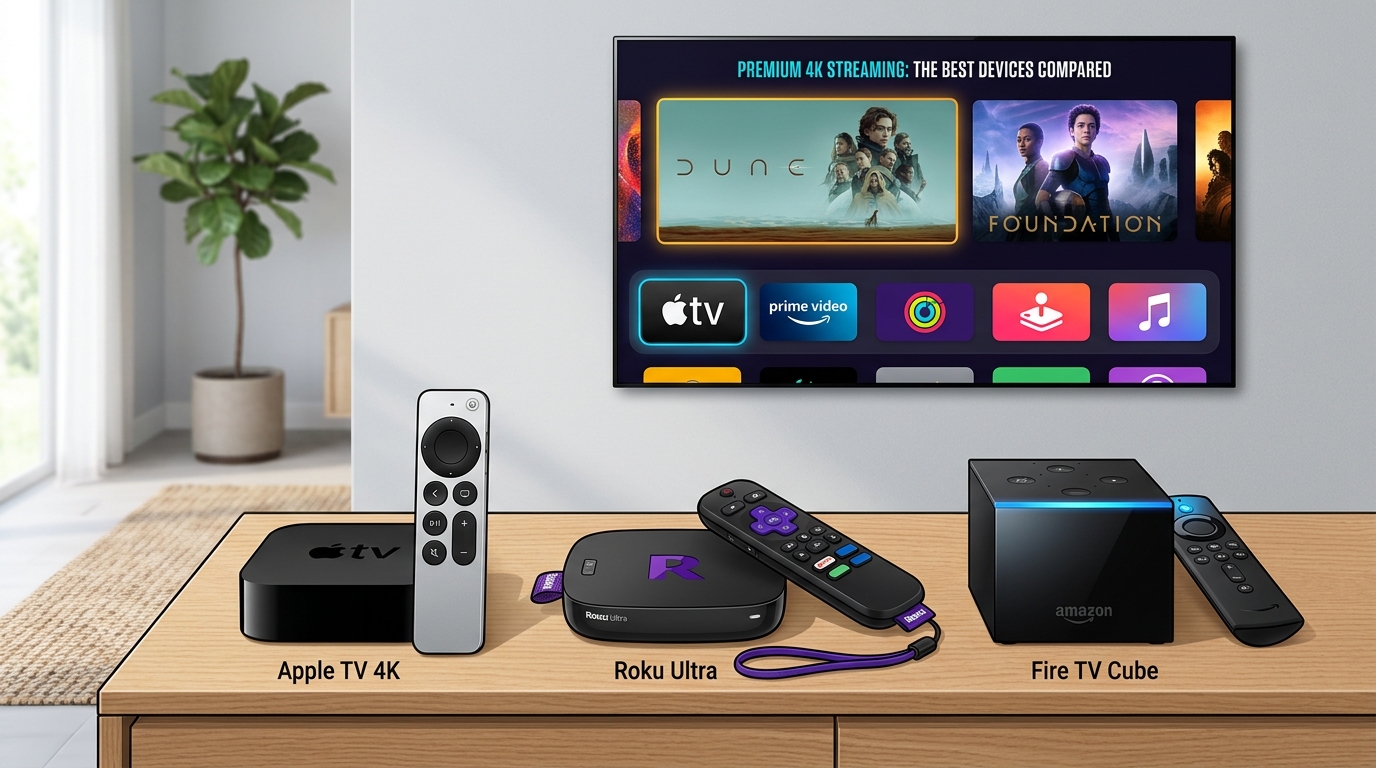
Which 4K streaming box is best between Apple TV 4K, Roku Ultra, and Amazon Fire TV Cube?
For premium home theater setups and Apple ecosystem users, the Apple TV 4K (128GB Wi-Fi + Ethernet) is the superior device, powered by the A15 Bionic chip with zero home screen advertisements, flawless automatic frame rate and dynamic range matching, and seamless spatial audio integration. For budget-conscious cord-cutters, the Roku Ultra offers the best platform-neutral value with a clean grid interface and headphone-enabled remote. For smart home voice automation, the Fire TV Cube provides unique hands-free Alexa microphones and an HDMI input for cable box pass-through.
Apple TV 4K vs Roku Ultra vs Fire TV Cube Device Matcher
Select your smart home ecosystem, audio receiver setup, and ad preference to determine the optimal 4K streaming box for your home theater.
1Silicon Performance Benchmarks: A15 Bionic vs Octa-Core vs MediaTek
The internal system-on-chip (SoC) architecture of a streaming device dictates interface responsiveness, app launching speeds, gaming capability, and long-term operating system support. In this technical category, the Apple TV 4K maintains an overwhelming competitive advantage.
Powered by Apple's A15 Bionic processor (the same silicon found in the iPhone 13 and iPad mini), the Apple TV 4K delivers CPU and GPU computing power that dwarfs dedicated streaming competitors. Interface navigation is completely instantaneous, 4K HDR video buffers without perceptible delay, and high-bitrate video streams decode flawlessly. Furthermore, the 128 GB model includes a physical Gigabit Ethernet port and dedicated Thread networking hardware, serving as a robust Matter smart home border router.
The Amazon Fire TV Cube features a capable 2.0 GHz octa-core processor paired with 2 GB of RAM and 16 GB of onboard storage. While significantly faster than entry-level Fire TV sticks, its performance is occasionally constrained by Amazon's advertising-heavy Fire OS. The Roku Ultra operates on a custom quad-core processor that delivers snappy channel navigation, though its graphical horsepower is designed purely for media streaming rather than advanced mobile gaming.
- Apple TV 4K: Apple A15 Bionic chip, 4 GB RAM, 64GB/128GB NVMe storage, Gigabit Ethernet.
- Fire TV Cube: Octa-Core (4x 2.2GHz + 4x 2.0GHz), 2 GB RAM, 16 GB flash storage, Wi-Fi 6E.
- Roku Ultra: Quad-Core Cortex processor, 2 GB RAM, USB 3.0 local media expandability, Wi-Fi 6.
2User Experience: Minimalist Elegance vs Sponsored Ad Billboards
The most noticeable daily differentiator between these three streaming ecosystems is the philosophy governing their home screen interfaces. As streaming hardware manufacturers shifted toward ad-monetization, user interfaces increasingly became digital billboards.
Apple tvOS remains the gold standard of consumer-centric software design. The home screen displays a clean, elegant grid of user-selected application icons with zero sponsored banner advertisements, autoplaying commercials, or third-party product promotions. The 'Top Shelf' feature previews content exclusively from the application currently highlighted, preserving user autonomy.
In stark contrast, Amazon Fire OS dedicates over half of the primary home screen to sponsored carousel advertisements, recommended Amazon Prime video purchases, and promotional integrations for Freevee and partner apps. Roku OS adopts a middle ground: while its central app grid remains straightforward, the right-hand interface rail features persistent banner advertising and dedicated commercial streaming channels.
3Audiophile and Videophile Benchmarks: Dolby Vision, Frame Rate Matching, and Atmos
For home theater enthusiasts invested in high-end OLED displays (such as LG C-Series or Sony Bravia) and dedicated multi-channel surround sound receivers, video processing standards are paramount.
The Apple TV 4K features automatic 'Match Content' settings for both Dynamic Range and Frame Rate. When enabled, the device switches your television's display mode to match the exact source framerate—such as 24.000 Hz or 23.976 Hz for cinema releases—eliminating the judder caused by 3:2 pulldown. In audio processing, Apple TV 4K decodes Dolby Atmos internally and outputs uncompressed multi-channel LPCM audio over eARC.
The Fire TV Cube uniquely includes an HDMI input pass-through port, allowing cord-cutters to connect a cable box, satellite receiver, or gaming console and control channel switching via Alexa voice commands. It also incorporates Super Resolution upscaling to sharpen sub-4K broadcast streams. The Roku Ultra supports Dolby Vision, HDR10+, and Dolby Atmos pass-through, alongside an integrated USB port for local media playback from external hard drives.
4Remote Control Ergonomics, Headphone Listening, and Ecosystem Synergy
A streaming box is only as good as its primary handheld controller. The Apple TV Siri Remote features an all-aluminum chassis with an intuitive touch-enabled clickpad, dedicated mute and power controls, and USB-C charging. Apple ecosystem integration allows users to type passwords on their iPhone, use Apple Watch for playback controls, and share dual-audio streams to two pairs of AirPods simultaneously.
The Roku Voice Remote Pro is acclaimed for consumer convenience: it features a rechargeable battery, hands-free 'Hey Roku' microphone with a physical lost-remote finder alert, and a dedicated 3.5mm headphone jack for zero-latency private audio listening without Bluetooth pairing hurdles.
The Fire TV Alexa Voice Remote provides comprehensive TV power and volume controls, customizable preset shortcut buttons, and far-field microphone integration built directly into the Fire TV Cube chassis, allowing hands-free voice control across the entire room even when the TV display is powered off.
Apple TV 4K vs Roku Ultra vs Fire TV Cube Hardware Matrix
| Hardware Feature | Apple TV 4K (3rd/4th Gen) | Roku Ultra (2026-2027) | Amazon Fire TV Cube |
|---|---|---|---|
| MSRP Retail Price | $129 (64GB) / $149 (128GB) | $99.99 (Frequent sales at $79) | $139.99 (Frequent sales at $109) |
| Processor (SoC) | Apple A15 Bionic (6-Core) | High-Performance Quad-Core | Octa-Core 2.0 GHz |
| Home Screen Ads | Zero Advertisements | Moderate Static Banner Ads | Heavy Sponsored Video Ads |
| Frame Rate Matching | Flawless 24p Native Match | Supported in Select Apps | Limited App Support |
| HDR Format Support | Dolby Vision, HDR10+, HDR10 | Dolby Vision, HDR10+, HDR10 | Dolby Vision, HDR10+, HDR10 |
| Unique Feature | Thread & Matter Hub / Spatial Audio | Headphone Jack on Remote / USB | HDMI Input Pass-Through / Alexa |
4-Step Blueprint to Select Your Ideal 4K Streaming Box
Audit Your Smart Home and Smartphone Ecosystem
If your household uses iPhones, iPads, and HomeKit, the Apple TV 4K provides unmatched ecosystem integration. If Amazon Alexa powers your home, choose the Fire TV Cube.
Evaluate Television Display & Audio Equipment
Match your streaming hardware to your panel: paired with a premium OLED and Dolby Atmos receiver, Apple TV's native frame rate matching delivers authentic cinema fidelity.
Determine Your Ad Tolerance & Navigation Preferences
Decide whether you prioritize a clean, ad-free interface (Apple TV) or are willing to accept sponsored home screen content in exchange for a lower purchase price (Roku/Amazon).
Connect via High-Speed Gigabit Ethernet Over Wi-Fi
For buffer-free 4K HDR playback and zero compression artifacting, always connect your streaming box via physical Cat6 Ethernet to your home router.
Curated Expert Video Walkthroughs & Wall Street Briefings
Frequently Asked Questions (Verified Statutory Answers)
Q1: Why should I buy a dedicated streaming box if my smart TV already has apps?
Built-in smart TV processors are typically low-cost chips that slow down significantly after software updates, feature aggressive telemetry data tracking, and often lack automatic 24p frame rate matching. Dedicated streaming boxes like Apple TV 4K or Roku Ultra offer faster navigation, longer software support, and superior audio/video decoding.
Q2: Does Apple TV 4K require an iPhone to use?
No. You can set up and operate an Apple TV 4K entirely using the included Siri Remote without owning an iPhone or iPad. However, having an iOS device unlocks convenience features like color balance calibration, password autofill, and spatial audio with AirPods.
Q3: Can I connect an external hard drive to play movies on these devices?
The Roku Ultra features a physical USB 3.0 port that natively plays MP4, MKV, and audio files from external hard drives. Apple TV 4K and Fire TV Cube do not feature USB media ports, requiring network media streaming apps like Plex or Infuse over local Wi-Fi.
Q4: Which device has the best remote control?
The Apple Siri Remote features premium aluminum build quality and touch gestures, while the Roku Voice Remote Pro is favored for practical utility due to its 3.5mm headphone jack for private listening and lost remote sound alert.
Q5: Do all three devices support Dolby Vision and Dolby Atmos?
Yes. All three streaming boxes support 4K Dolby Vision, HDR10+, and Dolby Atmos pass-through over HDMI eARC connections.
Q6: Why is the Fire TV Cube's HDMI input useful?
The Fire TV Cube's HDMI input allows you to plug in a cable box, satellite receiver, or game console directly into the streamer. You can then say 'Alexa, tune to ESPN' and the Cube switches HDMI inputs and changes cable channels automatically.
Q7: Does the Apple TV 4K show advertisements on the home screen?
No. Apple tvOS is the only major streaming operating system that features zero banner ads, sponsored video recommendations, or pop-up commercials on its primary home screen grid.
Q8: What is Thread and Matter support on the Apple TV 4K?
The 128 GB Apple TV 4K includes dedicated Thread radio hardware, allowing it to function as a home hub and border router for smart home accessories like smart locks, lights, and thermostats certified under the universal Matter standard.
Q9: Which streaming device uses the least power?
All three devices are energy-efficient, typically drawing between 3 and 7 watts during 4K streaming and less than 1 watt in standby mode, costing under $2 per year in electricity.
Q10: Can I use Apple TV 4K with non-Apple headphones?
Yes. Apple TV 4K supports standard Bluetooth audio pairing with Sony, Bose, or any third-party wireless headphones, though features like head-tracked Spatial Audio are exclusive to Apple AirPods and Beats products.




Verified X (Twitter) & LinkedIn Expert Insights
“The built-in smart TV apps on your LG or Samsung will slow down after two years. Moving to an Apple TV 4K with the A15 chip completely eliminates the lag, matches 24fps cinema framerates properly, and gives you zero home screen ads.”
“For non-technical family members, Roku Ultra remains the easiest recommendation. The private listening headphone jack on the remote is a lifesaver for late-night viewing, and the interface is intuitive without requiring an Apple ID.”